Lab sampling
Goals, benchmarks, sampling needs
OEM / ODM / Multi-client · multi-SKU
SKUs from the same formula share request forms where they apply.
Sampling, sign-off, testing, quoting and documentation all connect in one project.
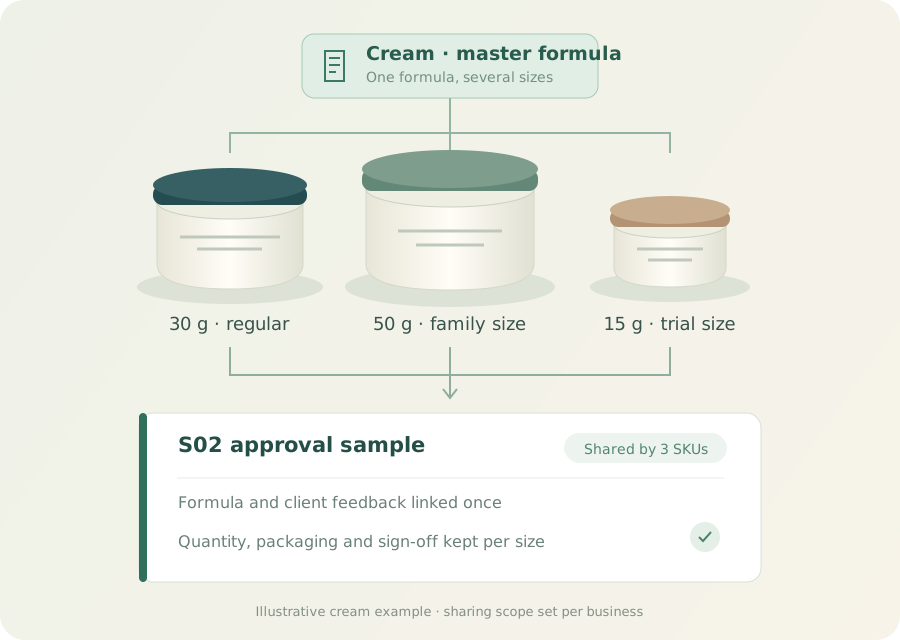
01 / One formula · many SKUs
Different sizes or packs of the same formula link to one product series. Applicable request forms are handled together while specs, quantities and sign-off status are tracked per SKU.
What you gainFewer duplicate forms, with each SKU’s delivery differences preserved.
| SKU / size | Packaging & sign-off | Shared request |
|---|---|---|
| Regular · 30 gSKU-CREAM-01 | Glass jarAwaiting client | S02 Sample sign-offFormula version · client feedback Applicable SKUs · sign-off log |
| Family · 50 gSKU-CREAM-02 | Wide-mouth jarFeedback received | |
| Trial · 15 gSKU-CREAM-03 | Mini jarDocs missing |
02 / Standard request forms
New product lines get steps from a template. Click a phase to see its forms; enable and configure per business.

Click to switch scenarios
01 / Sampling & sign-off
Benchmarks, sampling requirements, formula versions and client feedback go on the right request form.
What you gainR&D gets a fuller brief, and sign-offs are easier to verify.
Goals, benchmarks, sampling needs
Order info, formula choice, samples & feedback
02 / Testing, compatibility & quotes
Test items, labs, packaging conditions and quote lines are organized separately; files and approvals stay with each form.
What you gainSee what is missing or pending — less back-and-forth.
Tests, lab, samples & report
Packaging, conditions, period & results
Quantities, line items, validity & approval
03 / Packaging, design & artwork
Size and material, design files and print artwork each keep their own versions and sign-offs.
What you gainBrand and factory check the same file — fewer wrong-version mistakes.
Size, material, bottle & parts
Design files, versions & status
Dielines, printing & sign-off
04 / Documents & deliverables
Product filing documents, barcodes and extra deliverables are organized by project, with owner and status checked item by item.
What you gainA clear deliverables list, with the right version easy to find later.
Target market, files & status
Application, code & labeling status
For applicable device projects
Extra needs, custom docs & items
Fill in structured fields, pick a formula, link multiple SKUs, upload and preview files, see the conversation history and start approvals.
Related fields can be prefilled; owner, participants, planned dates and status are kept in one place.
Each request form keeps a snapshot when created, so later template changes do not overwrite it.
Work items are enabled per project. Specialized flows like UDI are configured where they apply and are not a default for ordinary cosmetic projects.
03 / OEM desk
Click to switch scenarios
Factory view / lab tests
Rolled up across projects by form type — see in-progress, done and blocked items, then open the project to follow up.
What you gainOpen fewer client projects and tackle what affects delivery first.
Sales view / quotes
Quote status across projects, linked to quantities, specs and approval notes — jump back to the form to continue.
What you gainLess time hunting for quote versions and sign-offs.
Collaboration view / packaging & files
Track packaging, design and artwork by work item to pinpoint blocked projects and owners.
What you gainCoordinate testing and delivery early instead of finding gaps at the deadline.
Illustrative data showing the cross-project roll-up; not real orders or volumes.
04 / Sign-off, shipping & approvals
Formulas, sample feedback, group chats and files link to each step. Tracking numbers pull shipment status, and approvals write back through configured workflows.
What you gainNo more digging for chat screenshots, tracking numbers and sign-off files.

Approver, decision, time and files are all kept.
The next lab test can find the right sample and version.
05 / Client assets & sign-off records
Access to formulas, quotes and briefs is controlled by tenant, client and role; form snapshots and approval records back up every handover.
What you gainClear scope of collaboration — client data and past sign-offs each have a clear owner.

Form snapshots, file versions, approval decisions, people and timestamps are linked to the project and work item for handover and audit.
Choose the plan your team needs. Private enterprise deployment, client permissions and IM integration scope are confirmed against your actual workflows.
06 / Brand–factory relationships
See manufacturers linked to a brand, or brands linked to a factory, and use filing data over time to find leads worth checking.
See shared request forms, the cross-project desk, shipping approvals and client data management.